


 ChatGPT
  Perplexity
  Claude
  Google AI Mode
  Grok
Grok Elasticsuite Magento 2 by SmileLab
Summary
Key takeaways
-
SmileLab’s ElasticSuite is built to improve product search relevance and onsite discovery, with the goal of improving conversions.
-
It adds full-text search so customers can find products by typing queries in the search bar.
-
Autocomplete predicts and completes keywords while suggesting relevant products as users type.
-
Advanced filters help users narrow results using multiple criteria (e.g., price range, brand, size).
-
Behavioral data can be used to surface relevant products based on previously viewed items and wishlist activity.
-
The article positions ElasticSuite as available for Magento 2 and Magento Commerce 2.
-
ElasticSuite is described as open source (no license cost).
When this applies
Use ElasticSuite when your catalog is large enough that default search and navigation don’t consistently help shoppers find what they want quickly. It’s especially useful if search is a major driver of conversions and you want better relevance through autocomplete, filtering, and behavior-informed recommendations.
When this does not apply
Skip (or deprioritize) ElasticSuite if your store has a small catalog where browsing is already easy, or if your search needs are minimal and you don’t want additional infrastructure/maintenance overhead that typically comes with advanced search stacks.
Checklist
-
Confirm your core problem: low search conversion, poor relevance, too many “no results,” weak filtering, or slow product discovery.
-
Define your success metrics (search-to-product-click rate, search conversion rate, “no results” rate, time-to-product).
-
Validate platform fit: Magento 2 / Magento Commerce 2 (as stated in the article).
-
List must-have features you want enabled: full-text search, autocomplete, advanced filters, behavioral relevance.
-
Decide where autocomplete should show results (products only vs broader content, depending on your UX goals).
-
Plan your filter strategy (which attributes matter most: brand, size, price, etc.).
-
Audit catalog data quality (attributes, naming consistency), because search relevance depends on it.
-
Test behavior-based relevance assumptions (viewed items + wishlist) and decide what you want to recommend.
-
Prepare a staging environment and run search UX tests (autocomplete, filters, result relevance).
-
Benchmark performance before/after (search response time, category browsing speed).
-
Roll out gradually (one store view / one category-heavy segment) and compare results.
-
Add monitoring for search quality (top queries, failed queries) and set a review cadence.
-
Document your search rules/settings so future catalog changes don’t break relevance.
-
If you lack in-house Magento expertise, plan implementation ownership (internal vs partner).
Common pitfalls
-
Installing advanced search without fixing catalog attribute quality, then blaming the engine for weak relevance.
-
Enabling too many filters and creating noisy, confusing navigation instead of clarity.
-
Treating behavioral relevance as “set and forget” (it needs review to stay aligned with merchandising goals).
-
Not testing autocomplete UX on mobile (it can easily become intrusive or too heavy).
-
Measuring only traffic changes instead of search-specific KPIs (search conversion, “no results,” CTR from search).
-
Rolling out globally without staged validation, then discovering theme/layout issues across templates.
Elasticsuite Magento 2 extension is a powerful tool provided by SmileLab with a goal to improve the search of goods and positions within ecommerce websites, and improve conversions on ecommerce solutions.
Why do you need the ElasticSuite Magento 2 Extension?
When you have an online shop with many items to buy, you want shoppers to find relevant goods with ease. With ElasticSuite you may not only group all your products into categories, but also use behavioral data of your website visitors to offer relevant products based on the items they’ve viewed.
Main features of Magento 2 Elasticsuite
- Full-text search. Using Elastic Suite you can implement a search module within your website so that customers can find a particular product by typing it into the search bar.
- Autocomplete. This feature involves a predicting method to finish the keywords your users are typing. For example, when a user wants to type “Shirt” as a keyword, the system will try predicting the word they want to type starting from the letter “S”.
- Advanced filters. Using advanced filters, customers can include multiple criteria to make their searches more precise (price range, brand, size, etc.)
- Behavioral data. Based on your customer’s previously viewed items and wishlist, your online shop will provide similar goods next time this customer enters your website.
How Does Elasticsuite Magento 2 Extension Work?
Below you can find one of the ways how to use ElasticSuite for your ecommerce solution. This is a screenshot taken from the demo provided by SmileLab.
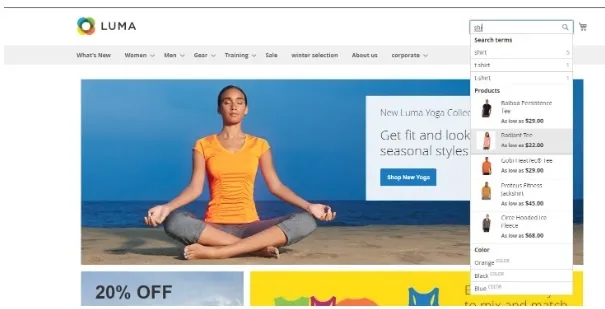
When users want to type a keyword in the search bar, the system autocompletes the word for them, while offering products they might be looking for and narrowing their search.
Available for
This extension is available for Magento 2 and Magento Commerce 2
How much does it cost?
Elastic Suite is an open source product.
Where to buy
Click to get access to the extension
How do you integrate Magento 2 ElasticSuite?
If you need to connect ElasticSuite to your website and don’t have a Magento developer, you can ask us to do it. We specialize in Magento website development and you can turn to us for anything where you require a software developer’s help. Also, check out our Magento integration services to learn more about our offers.
You may also like: Top 20 free and paid Magento 2 extensions
Elogic Commerce recommends also:

Get in Touch
Looking for a partner to grow your business? We are the right company to bring your webstore to success.