

 ChatGPT
  Perplexity
  Claude
  Google AI Mode
  Grok
Grok How to Choose a B2B Ecommerce Platform in 2026
Summary
Key takeaways
- Choosing a B2B ecommerce platform is fundamentally different from choosing a B2C storefront platform because pricing, approvals, account structures, and ERP dependencies are much more complex.
- The strongest shortlists for serious B2B evaluation are Adobe Commerce, Shopify Plus, BigCommerce, and commercetools.
- Adobe Commerce is the strongest fit for complex B2B requirements, deep ERP integrations, and businesses that need extensive customization control.
- Shopify Plus is better suited to businesses that prioritize speed, lighter implementation, and simpler operational management.
- BigCommerce sits in the middle as a more accessible SaaS option with reasonable flexibility and solid headless readiness.
- commercetools is the strongest option when composable architecture is a firm requirement and the business has the engineering maturity to support it.
- Integration readiness across ERP, CRM, PIM, and OMS is often the single most important factor in long-term success and cost control.
- Total cost of ownership matters more than subscription price because implementation, integrations, maintenance, and team costs often outweigh license fees.
- Composable commerce is powerful, but only for teams with strong engineering and DevOps capability; otherwise it becomes an expensive source of complexity.
- The right platform is the one that fits your business model, internal operating model, and system landscape, not the one with the best-looking demo.
When this applies
This applies when a business is selecting or replacing a B2B ecommerce platform and needs a structured way to compare options based on real operational requirements. It is especially relevant for manufacturers, distributors, wholesalers, and mid-market or enterprise merchants that depend on customer-specific pricing, ERP-led processes, quote workflows, approval chains, catalog segmentation, and multi-region operations. It also applies when leadership needs to balance flexibility, integration depth, implementation effort, and long-term operating cost rather than choosing a platform based on popularity or surface-level features.
When this does not apply
This does not apply when the business is launching a simple ecommerce store with minimal customization, limited integrations, and no meaningful B2B workflow complexity. It is also less relevant when the primary goal is a very fast launch for a single market, single catalog, and lightweight operational model. In those cases, a simpler platform decision may be enough, and a deep architectural evaluation would be unnecessary overhead.
Checklist
- Define the B2B capabilities your business cannot operate without.
- Document customer-specific pricing requirements in detail.
- Map company account structures, buyer roles, and permission levels.
- Review quote, RFQ, and approval workflow needs.
- Audit all required ERP, CRM, PIM, and OMS integrations.
- Assess whether your business truly needs composable or headless architecture.
- Evaluate your internal engineering and DevOps capacity honestly.
- Compare platforms on total cost of ownership, not just subscription cost.
- Estimate implementation complexity before committing to a shortlist.
- Forecast growth in SKUs, traffic, regions, and storefronts.
- Check how each platform handles multi-store, multi-region, and multi-currency operations.
- Pressure-test each option against your real operating model, not a vendor demo.
- Identify the main constraint driving the decision: budget, timeline, integrations, or team capacity.
- Validate post-launch support requirements for each platform.
- Revisit assumptions around budget, partner availability, and integration effort before making the final choice.
Common pitfalls
- Choosing a platform because the demo looks polished rather than because it matches real procurement workflows.
- Underestimating ERP integration as the main source of delivery risk and cost.
- Assuming a B2C-first platform can handle complex B2B needs with only minor add-ons.
- Focusing on subscription price while ignoring implementation and maintenance costs.
- Choosing composable architecture without the team maturity to operate it.
- Skipping a proper audit of integrations, middleware, and data flows.
- Confusing headless readiness with full composable suitability.
- Ignoring post-launch operational burden when comparing platforms.
- Treating all platforms as interchangeable when their strengths are structurally different.
- Making the decision before defining what must be true for the platform to succeed internally.
Choosing a B2B ecommerce platform is not the same exercise as picking a storefront for a direct-to-consumer brand. B2B merchants operate with customer-specific pricing, company account hierarchies, procurement approval chains, ERP-driven order and inventory logic, and catalogue complexity that generic “best platform” guides barely mention—making enterprise ecommerce development a critical consideration in platform selection.
If you are evaluating platforms for a manufacturer, distributor, wholesaler, or mid-market/enterprise business with serious integration requirements, this guide gives you the framework to make that decision with confidence.
It covers four platforms that serious B2B buyers actually shortlist in 2026 — Adobe Commerce, Shopify Plus, BigCommerce, and commercetools — and compares them on the criteria that determine B2B success: feature depth, ERP integration readiness, composable architecture, total cost of ownership, and implementation complexity.
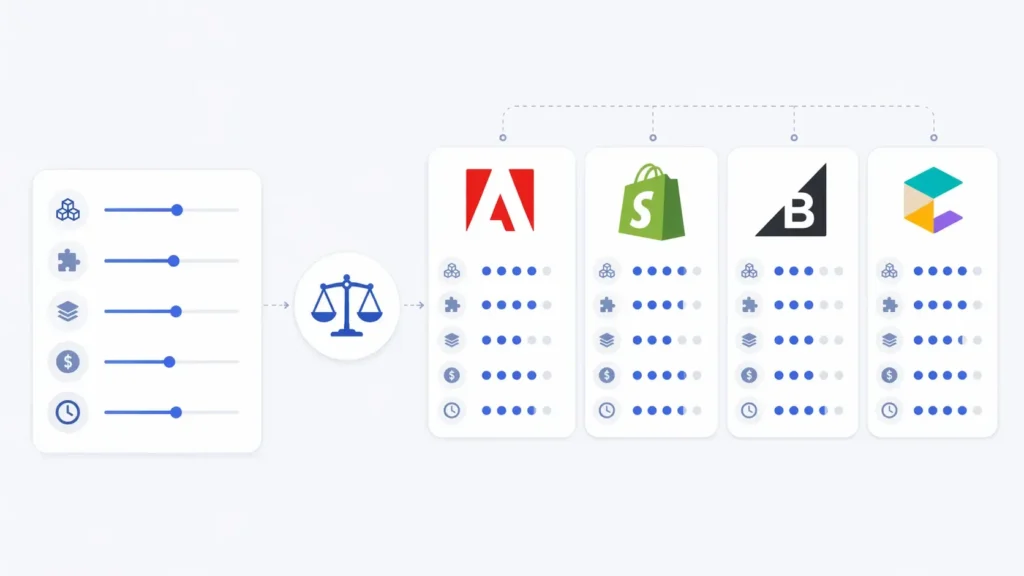
Start with the decision matrix below, then dig into the criteria and platform evaluations that follow.
Quick Decision Matrix
This matrix provides an editorial assessment of each platform’s relative strengths across the criteria that matter most for B2B buyers. Ratings are directional and based on current platform capabilities; they are not objective scores.
| Criterion | Adobe Commerce | Shopify Plus | BigCommerce | commercetools | Weight | Why It Matters |
|---|---|---|---|---|---|---|
| B2B feature depth | Strong | Moderate | Moderate | Strong | High | Pricing, accounts, approvals, RFQ |
| ERP integration | Strong | Moderate | Moderate | Strong | High | SAP, NetSuite, Dynamics fit |
| Composable ready | Moderate | Limited | Moderate | Strong | Medium | API-first, headless, MACH |
| TCO profile | High | Medium | Low–Med | High | High | License + build + run costs |
| Implementation | Heavy | Light | Moderate | Heavy | Medium | Time-to-launch, team size |
| Multi-store/region | Strong | Moderate | Strong | Strong | Medium | Brands, regions, currencies |
| Best for | Complex B2B | DTC adding B2B | Mid-market B2B | Composable enterprise | — | Ideal merchant fit |
Ratings reflect editorial judgement based on official documentation and implementation experience. “Strong” means native, deep capability; “Moderate” means capable with some gaps or add-ons; “Limited” means partial or bolted-on.
How B2B Platform Selection Differs from B2C
B2C platform advice focuses on checkout conversion, storefront design, and app ecosystem breadth. B2B platform selection introduces a different set of priorities:
- Customer-specific pricing. B2B buyers expect negotiated, contract-level pricing per account, location, or buyer group — not a single public price list.
- Account hierarchies. Customers are companies with multiple buyers, approvers, and budget holders operating under one account. The platform must model that structure.
- Approval workflows. Purchase orders often require internal approval before submission. Configurable approval chains reduce manual process and support governance.
- ERP integration. B2B merchants typically run on ERP systems that govern inventory, pricing, and fulfilment. The ecommerce platform must integrate deeply — not superficially — with those systems.
- Quote and RFQ support. Many B2B transactions begin with a request for quote, not a cart. The platform must handle quote creation, negotiation, and conversion to order.
- Catalogue segmentation. Restricted catalogues, shared catalogues, and product visibility rules by customer group are standard B2B requirements.
If your shortlisted platform cannot handle these requirements natively or through supported first-party extensions, you will spend your integration budget compensating for structural gaps—an issue often rooted in misaligned ecommerce architecture.
What Matters Most When Choosing a B2B Ecommerce Platform
Use the following criteria to score each platform against your requirements. Not every criterion carries equal weight for every business — but overlooking any of them introduces risk.
ERP, CRM, PIM, and OMS integration readiness
Integration with your core systems is typically the single largest factor in implementation success and ongoing operational cost. Evaluate native connectors, API depth, middleware requirements, real-time sync capabilities, and the long-term cost of maintaining integrations. For most B2B merchants, this criterion alone narrows the shortlist significantly.
Customer-specific pricing and catalogue support
Can the platform deliver negotiated pricing per account, location, or buyer group? Can it segment catalogues so different customers see different products and prices? These are non-negotiable for most B2B operations.
Account hierarchies and buyer roles
Does the platform support company accounts with multiple users, role-based permissions, and organizational structures that mirror how your customers actually operate?
Quote, RFQ, and approval workflows
For merchants where transactions begin with quotes rather than direct purchases, built-in RFQ and approval workflow support avoids costly custom development later.
Composable and headless readiness
If your architecture strategy involves decoupling the frontend from backend commerce logic, evaluate API coverage, headless storefront support, and maturity of the platform’s API-first architecture—especially in the context of composable commerce and headless ecommerce development. Be honest about whether your team can operate a composable stack day to day.
Total cost of ownership
Licence fees are the most visible cost but often the smallest component of TCO. Implementation, integration, ongoing maintenance, extension costs, and internal team requirements drive the real number. Evaluate TCO over three to five years, not annual subscription cost.
Implementation complexity and time to launch
How long will it take to go live? What development resources are needed? What is the realistic post-launch support burden? These factors determine whether a platform choice is operationally viable for your team.
Multi-store, multi-region, and multi-currency
If you operate across geographies, brands, or business models, evaluate how each platform handles multiple storefronts, currency management, tax rules, and localised content from a single backend.
B2B Ecommerce Platforms to Evaluate in 2026
The following platforms represent the most common shortlist candidates for B2B enterprise merchants. Each evaluation focuses on B2B-specific strengths and limitations.
Adobe Commerce (Magento)
Overview: Adobe Commerce is an enterprise ecommerce platform built on the Magento open-source foundation. Available as a PaaS deployment or as Adobe Commerce as a Cloud Service (ACCS), a SaaS-style model introduced in mid-2025. It supports both B2B and B2C from a single installation.
Best for: Manufacturers, distributors, and enterprises with complex B2B requirements, deep ERP integration needs, multi-brand operations, and teams that need extensive customization control.
B2B strengths: The deepest native B2B feature set among the platforms evaluated. Includes company accounts with buyer roles and permissions, shared catalogues with customer-specific pricing, negotiable quotes with online negotiation workflows, requisition lists, quick order by SKU, purchase orders with configurable approval rules, and company hierarchy management. The B2B extension receives regular updates, including quote templates for recurring B2B orders—making it a strong foundation for B2B Adobe Commerce development.
ERP integration: Strong. Open architecture supports deep integration with SAP, NetSuite, Microsoft Dynamics, and Oracle through its API surface and middleware ecosystem. Custom connector development is straightforward for experienced teams, making it well-suited for ERP integration for Adobe Commerce. ACCS adds managed infrastructure but may introduce some customisation constraints.
Composable readiness: Moderate and improving. Supports headless architecture via GraphQL APIs and the newer Edge Delivery Services framework. Not API-first by design in the way commercetools is, but increasingly capable for merchants who want composable optionality without a full MACH commitment.
TCO: Typically the highest among the four platforms. Pricing is quote-based and not publicly disclosed; it scales with GMV, as outlined in Adobe Commerce pricing. Implementation complexity, extension costs, hosting (for PaaS), and ongoing maintenance are significant cost drivers. ACCS may reduce infrastructure costs but limits customisation flexibility.
Key limitations: High implementation cost and complexity. Requires experienced developers. Performance optimization needs ongoing attention. Extension and third-party dependency can increase both cost and maintenance burden.
Ideal merchant profile: Enterprise B2B merchants with complex catalogue, pricing, and integration requirements who have the development resources to build and maintain a deeply customized commerce platform.
Shopify Plus
Overview: Shopify Plus is the enterprise tier of the Shopify ecosystem, a fully managed SaaS platform. Pricing currently starts at approximately $2,300/month on a three-year term, with a variable component based on GMV above certain thresholds—reflecting the scope of Shopify Plus features available to enterprise merchants.
Best for: Fast-scaling DTC brands adding a B2B channel, and merchants who prioritize speed-to-market and operational simplicity over deep customization.
B2B strengths: Native B2B capabilities include company profiles with multiple locations, private catalogues with customer-specific price lists, payment terms (Net 15, Net 30, etc.), purchase order support, tax-exempt customer handling, and a buyer portal for order history and reordering. B2B and DTC can be managed from the same admin. Up to ten expansion stores are included with the subscription for regional or B2B-specific storefronts.
ERP integration: Moderate. Higher API rate limits than standard Shopify plans. Integrations with major ERPs are available through middleware partners and third-party connectors, but deep, real-time bidirectional ERP integration is more complex to achieve than on open-architecture platforms. Evaluate middleware costs carefully for heavyweight ERP requirements.
Composable readiness: Limited. Supports headless storefronts via the Storefront API and Hydrogen framework, but the platform is fundamentally monolithic. Multi-storefront headless deployments require separate Shopify accounts, adding cost and complexity.
TCO: Moderate. Base subscription plus variable GMV-based fees. Transaction fees are eliminated when using Shopify Payments. App ecosystem costs commonly add meaningful spend. TCO is typically lower than Adobe Commerce for simpler deployments, but app dependency and integration middleware can narrow the gap for complex B2B setups.
Key limitations: B2B feature depth is adequate for basic wholesale but lacks deep approval workflow configuration, advanced quote templates, and complex account hierarchy management compared to Adobe Commerce. Heavy reliance on third-party apps for functionality beyond the core platform.
When Shopify Plus is still the right choice
Shopify Plus deserves serious consideration when speed-to-market, operational simplicity, and managed infrastructure are priorities. For DTC brands layering a moderate B2B channel on top of an existing consumer business, the platform’s unified admin, reliable uptime, and lower operational overhead are genuine advantages. If your B2B requirements are relatively straightforward — company accounts, price lists, payment terms, buyer portal — and you do not need deep multi-level approval chains or heavyweight ERP integration, Shopify Plus can be the fastest and most cost-effective path to a working B2B storefront. The platform is not a compromise in every scenario; it is a legitimate enterprise choice for the right merchant profile.
Ideal merchant profile: High-growth DTC brands adding B2B. Merchants with straightforward wholesale requirements who value speed, simplicity, and managed infrastructure.
BigCommerce
Overview: BigCommerce is a SaaS ecommerce platform with a separate B2B Edition add-on. Standard plans range from approximately $29–$399/month based on revenue tiers, while Enterprise plans are custom-priced. The B2B Edition is an additional add-on with custom pricing, often requiring specialized BigCommerce development to fully leverage its capabilities.
Best for: Mid-market B2B merchants who want more built-in flexibility than Shopify Plus at a lower TCO than Adobe Commerce. Particularly suited for DTC brands adding a wholesale channel, or mid-sized wholesalers and distributors with moderate complexity.
B2B strengths: The B2B Edition provides company account management with buyer roles, customer group segmentation, RFQ and quote management, custom price lists, net payment terms, an invoice portal, sales rep masquerade functionality, shared shopping lists, and a buyer portal. Open API architecture supports headless implementations and multi-storefront management from a single backend.
ERP integration: Moderate. Supports integrations with major ERP systems through partner connectors and its open API. Deep bidirectional integration typically requires middleware.
Composable readiness: Moderate. Headless-ready with strong API coverage and support for decoupled frontends. More architecturally open than Shopify Plus, less natively composable than commercetools.
TCO: Generally lower than Adobe Commerce and often competitive with Shopify Plus for mid-market merchants. No platform transaction fees on any plan. B2B Edition add-on adds to the subscription. Revenue-tier-based pricing forces automatic plan upgrades as sales grow.
Key limitations: B2B Edition is an add-on, not a core platform capability — which can feel bolted-on for complex operations. Approval workflow depth is limited compared to Adobe Commerce. Custom theme development requires Stencil framework expertise. Revenue-tier-based upgrade logic can surprise merchants at growth thresholds.
Ideal merchant profile: Mid-market B2B merchants, DTC brands expanding into wholesale, or distributors with moderate complexity who want a balance of flexibility, cost-efficiency, and SaaS simplicity.
commercetools
Overview: commercetools is a cloud-native, API-first, composable commerce platform built on MACH principles. It provides modular commerce building blocks that enterprises assemble into custom commerce architectures. Pricing is order-based, with tiered editions (Core, Foundry, Premium). Pricing is not publicly listed.
Best for: Enterprise manufacturers, distributors, and B2B operators who need maximum flexibility, have strong internal engineering teams or experienced system integrator partners, and are building for long-term composable architecture.
B2B strengths: Native capabilities include business units with granular role-based permissions, multi-level approval flows, dynamic pricing (tiered, volume-based, business-unit-specific), customer-group segmentation, automated quote management, product selections for catalogue segmentation, and advanced search with B2B-specific entitlements — making it a strong fit for scalable commercetools development.
ERP integration: Strong. API-first architecture is designed for deep integration with enterprise systems. Real-time data synchronization is a core architectural capability, not an afterthought. Pre-built connectors are available for major ERP systems through the partner ecosystem.
Composable readiness: The strongest composable platform on this list. API-first by design, fully headless, MACH-aligned. Includes a frontend solution for rapid storefront development but is explicitly designed to work with any frontend technology.
TCO: Significant. Platform costs scale with order volume across tiered editions. Implementation investment is substantial (system integrator, frontend development, integration engineering), but ongoing platform costs are more predictable than GMV-based models—an important factor when evaluating ecommerce development costs. Real-world B2B implementations have launched in four to six months with lean teams, though complex deployments take longer.
Key limitations: Requires strong engineering capability or an experienced system integrator. The platform provides commerce building blocks, not a ready-to-use storefront. Higher upfront investment than SaaS alternatives. Demands organizational maturity in DevOps, API management, and multi-vendor governance.
Ideal merchant profile: Enterprise B2B organizations with strong technical teams, complex multi-market operations, and a strategic commitment to composable architecture.
B2B Feature Depth Comparison
This table compares native or supported first-party B2B capabilities as of early 2026. Capabilities marked “Add-on” require an official extension or edition upgrade. “API-supported” means the platform’s API allows building the feature, but it is not available out of the box.
| Сability | Adobe Commerce | Shopify Plus | BigCommerce | commercetools |
|---|---|---|---|---|
| Customer-specific pricing | Native | Native (price lists) | Add-on (B2B Ed.) | Native |
| Shared/restricted catalogues | Native | Native (private) | Add-on (B2B Ed.) | Native |
| Account hierarchies | Native (company hierarchy) | Basic (company profiles) | Add-on | Native (Business Units) |
| Approval workflows | Native (purchase orders) | Basic (buyer roles) | Limited | Native (multi-level) |
| RFQ / quote support | Native (negotiable quotes) | Not native | Add-on (B2B Ed.) | Native |
| Quote templates | Native (v1.5+) | Not available | Not available | API-supported |
| Purchase orders | Native | Native | Add-on (B2B Ed.) | Native |
| Requisition lists | Native | Not native | Via shopping lists | API-supported |
| Sales rep masquerade | Native | Not native | Add-on (B2B Ed.) | API-supported |
| Net payment terms | Via extension | Native (Net 15/30) | Add-on (B2B Ed.) | API-supported |
| ERP/PIM integration | Strong (open arch.) | Moderate (API/middleware) | Moderate (API) | Strong (API-first) |
| Headless/composable | Moderate (GraphQL) | Limited (Storefront API) | Moderate (open API) | Native (MACH) |
| Multi-storefront | Native | Up to 10 stores | Native | Unlimited |
Total Cost of Ownership Guidance
Platform TCO extends well beyond the licence or subscription fee. For B2B ecommerce platforms for manufacturers, the following cost layers typically determine real expenditure over a three to five year horizon.
Licence and subscription costs
- Adobe Commerce: Quote-based, GMV-dependent. Not publicly disclosed. Ranges vary widely by merchant size and feature tier.
- Shopify Plus: Approximately $2,300–$2,500/month base (varies by contract term), plus variable GMV-based component above certain thresholds.
- BigCommerce: Enterprise plans from approximately $1,000–$2,000+/month (custom). B2B Edition is an additional add-on. No platform transaction fees.
- commercetools: Order-based pricing across tiered editions. Not publicly disclosed.
All pricing figures are approximate, sourced from public third-party analysis, and subject to change. Verify directly with each vendor.
Implementation costs
Implementation is typically the highest upfront cost. Adobe Commerce and commercetools implementations commonly range from six figures upward, depending on complexity. Shopify Plus and BigCommerce implementations tend to start lower but scale quickly for complex B2B deployments with deep ERP integration.
Integration and ongoing costs
ERP, CRM, PIM, and OMS integrations are recurring cost drivers. Pre-built connectors, middleware licences, and custom integration maintenance can exceed the platform subscription over time. App and extension dependencies (particularly relevant for Shopify Plus) add ongoing spend. Internal team or agency costs for platform operation and maintenance should be factored into any three-year TCO comparison.
Composable and Headless Readiness
Composable commerce — assembling best-of-breed services into a custom architecture via APIs — is a real strategic option for enterprise B2B merchants with the engineering maturity to operate it. It is not right for everyone.
When composable makes sense
- You operate across multiple brands, markets, or business models with different frontend requirements.
- Your current monolithic platform cannot keep pace with business requirements.
- You have strong engineering capability and DevOps maturity.
- You can invest in a multi-year architecture strategy.
When is composable premature
- Your B2B operation is a single-brand, single-market business with moderate complexity.
- Your team does not have the engineering resources to manage multiple services and vendor relationships.
- Speed-to-market is the primary priority.
- Your budget does not support the upfront architecture and integration investment.
Platform composable readiness summary
- commercetools: Purpose-built for composable. API-first, MACH-aligned, headless by default. The strongest choice, if composable, is a firm requirement.
- Adobe Commerce: Composable-capable via ACCS and Edge Delivery Services. A pragmatic middle ground.
- BigCommerce: Headless-ready with strong API coverage. More open than Shopify Plus, less natively composable than commercetools.
- Shopify Plus: Limited composable readiness. Supports headless via Storefront API and Hydrogen, but is fundamentally monolithic.
Migration and Implementation Effort
The following comparison reflects typical implementation complexity for B2B deployments within broader ecommerce replatforming initiatives. Ranges are indicative; actual timelines depend heavily on integration scope and customization requirements.
| Factor | Adobe Commerce | Shopify Plus | BigCommerce | commercetools |
|---|---|---|---|---|
| Typical timeline | 4–12 months | 2–4 months | 2–6 months | 4–8 months |
| Data migration | Complex | Moderate | Moderate | Complex |
| Integration rebuild | Heavy | Moderate | Moderate | Heavy |
| Storefront rebuild | Heavy | Light–Moderate | Moderate | Heavy (custom) |
| Dev resources needed | 2–5+ FTEs | 1–2 FTEs | 1–3 FTEs | 2–5+ FTEs or SI |
| Post-launch burden | Ongoing, active | Light, managed | Moderate | Ongoing, active |
Timelines and resource estimates are indicative ranges based on typical B2B deployments. Complex implementations with deep ERP integration push all platforms toward the upper end.
How to Choose the Right Platform for Your Business
Work through the following steps to move from evaluation to decision:
- 1. Define must-have capabilities. List the B2B features your business cannot operate without. Use these as hard filters to eliminate platforms that do not deliver them natively.
- 2. Identify your real constraint. Is it integration complexity, time-to-market, engineering capacity, or budget? The answer determines which platform category is realistic.
- 3. Assess operating model fit. A platform is only as good as your ability to run it. If you cannot staff Adobe Commerce or commercetools expertise, those platforms become expensive bets regardless of feature strength.
- 4. Evaluate integration complexity honestly. Map every system the ecommerce platform must connect to. Count the integrations. Estimate the middleware. This is where budgets and timelines expand.
- 5. Budget for TCO, not sticker price. Add implementation, integration, maintenance, and team costs to the platform subscription. Compare three-year TCO across shortlisted options.
- 6. Pressure-test your assumptions. Write down what must be true for your platform choice to succeed: team capacity, integration partner availability, ERP upgrade timelines, budget approval. If any assumption is fragile, revisit the decision.
Common Mistakes in B2B Platform Selection
- Choosing a demo UX rather than a workflow fit. A platform that looks polished in a sales demo but cannot support your actual procurement workflows will create friction for every buyer interaction.
- Underestimating ERP integration. Integration is the dominant cost and risk factor in B2B deployments. Merchants who budget for the platform but not the integration consistently overshoot timelines and budgets.
- Ignoring B2B-specific requirements. Assuming a B2C-first platform can handle B2B complexity with apps or light customization is a common and expensive mistake.
- Choosing composable without the team to run it. Composable architecture delivers flexibility but demands engineering maturity. Without it, you trade one set of constraints for a more expensive set.
- Optimizing for subscription cost. The cheapest platform to license is rarely the cheapest to operate. TCO over three to five years is the only meaningful comparison.
When to Involve a Platform-Selection Partner
A platform-agnostic implementation partner adds value when architecture decisions have long-term consequences that exceed internal expertise; when B2B requirements span multiple platforms and require unbiased evaluation; when ERP or PIM integration complexity creates technical risk; when migration from a legacy platform involves data, workflow, and organizational change; or when launch timelines require experienced project governance. In these scenarios, B2B ecommerce consulting helps ensure informed decision-making and reduced execution risk. The right partner should bring certified platform expertise, integration engineering capability, and a track record with B2B merchants at your scale.
Frequently Asked Questions
What is the best ecommerce platform for B2B?
There is no single best platform. Adobe Commerce leads for complex B2B with deep integration. Shopify Plus suits fast-scaling brands adding a B2B channel. BigCommerce offers a mid-market balance. commercetools leads for enterprise composable architecture. The best platform is the one that fits your specific requirements, integration stack, team capabilities, and budget.
How much does a B2B ecommerce platform cost?
Subscription costs vary widely. However, subscription is typically the smallest part of total cost. Implementation, integration, maintenance, and team costs drive the real number, which commonly ranges from tens of thousands to several hundred thousand in the first year depending on complexity. Always evaluate three-year TCO.
Should I choose composable commerce for B2B?
Only if your organisation has the engineering maturity and budget to operate a modular, API-first architecture. Composable commerce provides maximum flexibility but requires strong DevOps capability and multi-vendor management. For most mid-market B2B merchants, a SaaS platform with headless optionality is more practical.
How long does B2B platform implementation take?
Typical timelines range from two months (straightforward Shopify Plus deployment) to twelve-plus months (complex Adobe Commerce or commercetools implementation with deep ERP integration). The dominant variable is integration complexity, not platform complexity.
What is the difference between B2B and B2C platforms?
B2B platforms must support customer-specific pricing, company account hierarchies, approval workflows, quote management, ERP integration, catalogue segmentation by buyer group, and procurement system compatibility. Platforms built primarily for B2C may offer these as add-ons, but depth and reliability vary.
Can I run B2B and B2C on the same platform?
Yes. All four platforms evaluated here support hybrid B2B/B2C operations. The approach differs by platform. Shopify Plus and BigCommerce manage both from a single storefront with buyer-specific logic. Adobe Commerce and commercetools support separate storefronts or business units under a unified backend.

Get in Touch
Looking for a partner to grow your business? We are the right company to bring your webstore to success.